¥500
App Store で開く
iPhone のみ対応
4.4MB
年齢4+
Finger3Dはどんなアプリ?
Finger3Dは、指先で直接操作して立体的な造形物を作成できるツールです。
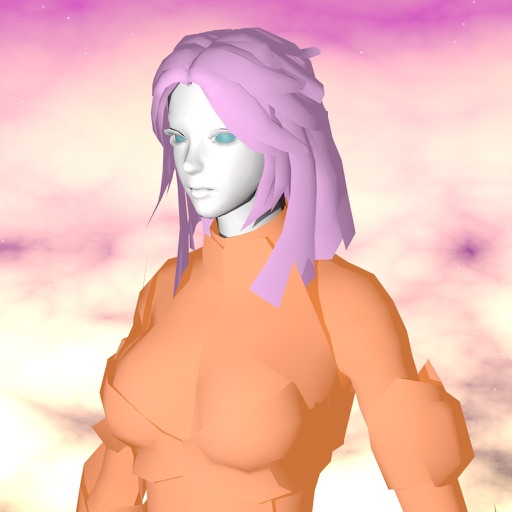
球体や円柱といった基本形状を組み合わせることで、複雑な形を作り上げられます。光の当たり方や素材の質感、透明度を細かく調整する機能も備わっています。視点を上や横へ切り替えて空間を見渡せるため、多角的な確認を行いながら造形を進められます。自分の指で頂点を動かしたり変形させたりしながら、理想の形を作り上げる工程に集中できます。
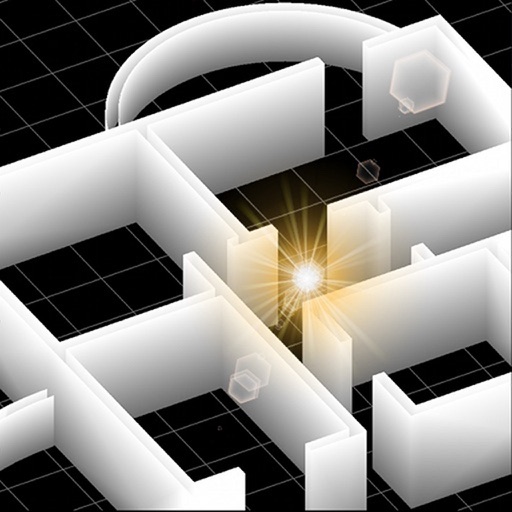
建築の設計図を立体化する際に、手元のデバイスで素早く形状を確認したい場面にぴったりです。製品のデザインや分子の構造を検討する専門家も、このアプリで直感的に造形を進められます。撮影した写真を質感として貼り付けられるため、より実在感のあるモデルを制作できます。
アノアプリによる紹介文です。デベロッパー公式の説明はApp Storeでご確認いただけます。
Finger3Dの注目ポイント
指先による直感的な造形
画面に触れる指の動きに合わせて立体的な形を直接動かせるため、直感的に操作が進みます。頂点の位置を微調整しながら理想の形へ変形させられるため、制作への集中を妨げません。
基本形状の組み合わせによる造形
球体や円柱といった基礎的な形状を組み合わせて複雑なモデルを構築できます。複数のパーツを繋ぎ合わせることで、独自の造形物を作り上げる工程をスムーズに進められます。
質感や光の当たり方の調整
素材の質感や透明度を細かく設定する項目が揃っています。光の当たり方を指定して変化を確認するため、より実在感のあるモデルを作り上げられます。
多角的な視点による空間確認
上や横など複数の視点から立体空間を見渡せる表示切替が行えます。向きを変えて細部をチェックしながら、意図した通りに形ができているかを確認しながら作業を進められます。
価格履歴
今の価格は500円です。記録を始めて2日ですが、価格はまだ変わっていません。記録が30日に満たないため、安いかどうかの判断はまだできません。
アノアプリが独自に収集した価格履歴をもとに分析しています。
- 買い時判定
- 判定材料を収集中
- 記録期間
- 2日
- 最頻価格
- ¥500
- 記録上の最安値
- ¥500
価格更新履歴
| 日付 | 価格 |
|---|---|
| 2026-09-25 | ¥500 |
ランキング推移
ランキングデータがありません。
ランキング圏内(100位以内)に入ると記録が開始されます。
ユーザーレビュー (当サイト投稿)
まだレビューがありません。最初のレビューを書いてみましょう。
アプリ更新履歴 更新停滞
Ver 4.2.1 2023-08-01
* Minor bugs fixed
TEXTURES:
* Added the ability to assign a texture to the selected faces of the 3D objects
* The 3D model is displayed using the texture also during the exploration / visualization of the 3D model (to enable or disable the TEXTURE visualization: double tap the screen with two fingers in 3D SPACE mode)
* Added the ability to choose the quality for the texture's image (in pixels) and the ability to “repeat” or “scale to fill” the textures on the selected faces of the 3D objects
* Added the ability to choose the vertical number of texture to apply to the walls exported by FingerCAD (useful for example to draw tiled bathrooms using .jpg and .png images for the textures - photo album's image textures): the horizontal repeat number of textures will be automatically calculated (so, You can scale the model and the system will automatically calculate for You the horizontal repeat number for the textures)
* Added the ability to use semitransparent textures (alpha channel used for the textures)
* Smooth shading for the texture
* New ground texture (You can now set the repeat number for the ground texture and its image quality in pixels)
* New visualization algorithms for the "sky" and "background images" textures (high quality and high visualization performances)
SHOT A PHOTO AND USE IT AS A TEXTURE FOR YOUR 3D MODEL:
* Added the “image picker for textures” to pick the image for the texture from the device’s photo albums
ILLUMINATION:
* New algorithms for the scene illumination, for the color 3D models and for the textures (fixed some bugs of visualization of the colors during zoom out)
* Added a sun light and an adjustable spot light
3D MODELING AREA:
* Full screen visualization mode
FACE MODELING (MODELING ON):
* New face modeling algorithms (fixed some bugs)
MODELING (EDIT ON):
* Added the ability to move only the selected part of an object at a certain distance (using the "MOVE+" and "MOVE-" buttons)
EXTRUDE:
* New extrude routines along X, Y, Z axis (with a selectable extrude distance)
FLAT SHADED or WIRED FRAME visualizations:
* Added the FLAT SHADED and WIRED FRAME visualizations for EDIT ON and MODEL ON modes (to choose FLAT SHADED or WIRED FRAME: double tap the screen with two fingers in EDIT ON or MODEL ON modes)
NORMALS CALCULATION:
* Fixed many bugs for the calculation of normals for: circle, sphere, cylinder, cone
UNDO / REDO:
* Added the undone and redone buttons
OBJ+MTL and TEXTURE archive:
* Added the “OBJ + MTL” and the “TEXTURE” filters
UNGROUP:
* New ungroup algorithm (optimized and fixed some bugs)
PERFORMANCES:
* The source code was optimized to reach high performances for the refresh rate, also when the texture is used for the materials of the 3D objects
TEXTURES:
* Added the ability to assign a texture to the selected faces of the 3D objects
* The 3D model is displayed using the texture also during the exploration / visualization of the 3D model (to enable or disable the TEXTURE visualization: double tap the screen with two fingers in 3D SPACE mode)
* Added the ability to choose the quality for the texture's image (in pixels) and the ability to “repeat” or “scale to fill” the textures on the selected faces of the 3D objects
* Added the ability to choose the vertical number of texture to apply to the walls exported by FingerCAD (useful for example to draw tiled bathrooms using .jpg and .png images for the textures - photo album's image textures): the horizontal repeat number of textures will be automatically calculated (so, You can scale the model and the system will automatically calculate for You the horizontal repeat number for the textures)
* Added the ability to use semitransparent textures (alpha channel used for the textures)
* Smooth shading for the texture
* New ground texture (You can now set the repeat number for the ground texture and its image quality in pixels)
* New visualization algorithms for the "sky" and "background images" textures (high quality and high visualization performances)
SHOT A PHOTO AND USE IT AS A TEXTURE FOR YOUR 3D MODEL:
* Added the “image picker for textures” to pick the image for the texture from the device’s photo albums
ILLUMINATION:
* New algorithms for the scene illumination, for the color 3D models and for the textures (fixed some bugs of visualization of the colors during zoom out)
* Added a sun light and an adjustable spot light
3D MODELING AREA:
* Full screen visualization mode
FACE MODELING (MODELING ON):
* New face modeling algorithms (fixed some bugs)
MODELING (EDIT ON):
* Added the ability to move only the selected part of an object at a certain distance (using the "MOVE+" and "MOVE-" buttons)
EXTRUDE:
* New extrude routines along X, Y, Z axis (with a selectable extrude distance)
FLAT SHADED or WIRED FRAME visualizations:
* Added the FLAT SHADED and WIRED FRAME visualizations for EDIT ON and MODEL ON modes (to choose FLAT SHADED or WIRED FRAME: double tap the screen with two fingers in EDIT ON or MODEL ON modes)
NORMALS CALCULATION:
* Fixed many bugs for the calculation of normals for: circle, sphere, cylinder, cone
UNDO / REDO:
* Added the undone and redone buttons
OBJ+MTL and TEXTURE archive:
* Added the “OBJ + MTL” and the “TEXTURE” filters
UNGROUP:
* New ungroup algorithm (optimized and fixed some bugs)
PERFORMANCES:
* The source code was optimized to reach high performances for the refresh rate, also when the texture is used for the materials of the 3D objects